A Complete Technical SEO Checklist: How to Build a Website Search Engines and AI Search Engines Can Understand
A Complete Technical SEO Checklist: How to Build a Website Search Engines and AI Search Engines Can Understand

Technical SEO is not the glamorous side of search engine optimization and Ai Visibility.
It does not usually produce the beautiful headline, the persuasive sales page, or the campaign idea everyone wants to talk about. But it quietly determines whether your website can be found, crawled, understood, trusted, and recommended.
A strong website is not only written for people. It must also be structured well enough for search engines, AI search tools, and automated systems to interpret it correctly.
That is where technical SEO comes in.
Technical SEO is the practice of ensuring your website’s foundation supports visibility. It helps search engines crawl your pages, index the right content, understand your site structure, evaluate user experience, and connect your content to the right search intent.
Today, that foundation matters even more because search is changing. People are no longer finding answers only through traditional blue links. They are using AI search, answer engines, assistants, and automated agents. These systems need clean, accessible, well-structured websites they can retrieve, understand, and cite.
This checklist walks through the key areas every serious website should audit, building on a basic understanding of how search engines work, from crawling to ranking.
What Is Technical SEO?
Technical SEO refers to the behind-the-scenes optimizations that ensure search engines can crawl, index, and understand your website effectively. Unlike on-page SEO, which focuses on content and keywords, technical SEO focuses on the infrastructure and foundation of your website. It involves improving site speed, mobile-friendliness, URL structure, security, crawlability, and more.
By addressing technical SEO fundamentals, you make it easier for search engines like Google and AI search tools to access and interpret your site. This helps improve search rankings, organic traffic, and overall visibility across traditional and AI-powered search platforms.
Technical SEO is essential for all websites, including those built on popular platforms like WordPress. It includes tasks such as optimizing css and javascript files, implementing self-referencing canonical tags, using content delivery networks, and ensuring accelerated mobile pages are properly configured.
In essence, technical SEO lays the groundwork that allows your content and on page SEO efforts to perform at their best, supporting both human visitors and AI systems that rely on clean, structured, and accessible websites.
The following is a checklist for a complete technical SEO workflow.
1. Look for Crawling and Indexing Issues
Before you worry about ranking, you need to confirm that search engines can actually access your website.
Crawling is the process search engines use to discover your pages. Indexing is the process of storing and organizing those pages so they can appear in search results.
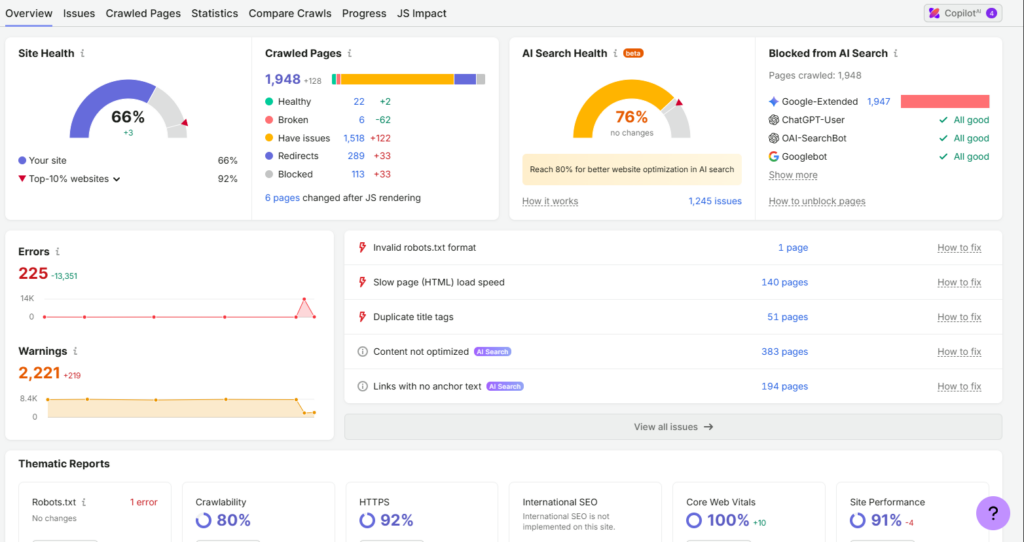
If your site cannot be crawled or indexed properly, your content may be invisible no matter how good it is, which is why a technical SEO audit checklist matters for making your website discoverable, crawlable, and indexable by search engines.
Regular audits also help maintain strong technical health and search visibility, especially when combined with SEO tools that monitor performance and AI-driven search impacts.
Check Whether Your Site Is Indexed
Start with the simplest question:
Can search engines find your important pages?
A quick way to check is to search for your domain and key pages in Google. You can also use tools such as Google Search Console to see which pages are in the google index, excluded, or affected by technical issues, and to monitor crawl errors, indexation, and search traffic; regular audits there help you identify and fix issues early.
Review your xml sitemap in Google Search Console to confirm new and updated pages are being discovered.
Pay attention to:
- important pages that are not indexed
- outdated pages still appearing in search
- duplicate or thin pages being indexed
- pages reported in Search Console as crawled but not indexed
- pages blocked by mistake
For a business website, your core service pages, important blog posts, location pages, product pages, and conversion pages should be indexable unless you have a clear reason to hide them.
Check for Duplicate Versions of Your Website
Many websites accidentally create multiple versions of the same site.
For example:
- http://example.com
- https://example.com
- http://www.example.com
- https://www.example.com
To users, HTTP and HTTPS may look similar, but to search engines they are different URLs. To search engines, they can look like separate versions unless configured properly.
This can dilute authority, create duplicate content issues, and confuse crawling. Google has treated HTTPS as a lightweight ranking signal since 2014, and modern browsers mark non-HTTPS pages as “Not Secure.”
Make sure your website resolves to one preferred version. The non-preferred versions should redirect cleanly to the same page version you want indexed.
Make Sure Your Robots.txt File Is Correct
Your robots.txt file tells search engine crawlers which parts of your website they can or cannot access.
This file is powerful, but it is also easy to misuse.
A single wrong instruction can block important parts of your site from being crawled. For example, accidentally disallowing your blog, product pages, or entire site can severely damage visibility.
Review your robots.txt file and confirm that:
- Important pages are not blocked
- Private or unnecessary areas are restricted where appropriate
- Your sitemap is referenced
- AI retrieval access is considered where relevant
Your goal is not to let every crawler access everything. Your goal is to make intentional decisions.
Fix Redirect Chains and Loops
Redirects are useful when pages move, URLs change, or old content is consolidated.
But too many redirects create problems.
A redirect chain happens when one URL redirects to another, which redirects to another, and so on. A redirect loop occurs when URLs redirect endlessly to one another.
Redirect chains waste crawl budget, slow down discovery, and create a poor user experience.
Good redirects should be direct, clean, and intentional.
If an old page has moved, send users and search engines straight to the final destination so redirects preserve link equity.
Fix Broken Links
Broken links damage both user experience and crawl quality.
When a visitor clicks a link and lands on a dead page, trust drops. When search engines repeatedly find broken links, they may treat your site as poorly maintained.
Use a site audit tool to assess both internal and external links and efficiently surface broken external links.
Also, fix broken external links, since they hurt user trust and waste authority.
Broken internal links matter most because they affect your site’s structure. If an important page is linked incorrectly, search engines may struggle to discover it. Users may also abandon the journey before converting, so replace or update broken links to relevant pages where appropriate.
Fix Server Errors
Server errors are technical signals that something is wrong behind the scenes.
A few temporary errors may happen from time to time. But repeated server errors can prevent search engines from crawling your site reliably.
Watch for errors such as:
- 500 internal server errors
- 502 bad gateway errors
- 503 service unavailable errors
- timeout issues
- unstable hosting performance
Your hosting environment is part of your SEO foundation. A slow, unstable, or poorly configured server can weaken even the best content strategy.
2. Optimize for a Good User Experience
Technical SEO is not only about crawlers. It also supports people and search engine optimization through crawlability, page speed, and security.
Search engines want to send users to pages that load properly, work well on mobile devices, and do not frustrate the visitor, which is a core part of building a strong online presence in 2026.
A technically healthy website should feel smooth, stable, and easy to use. In 2026, page speed and security remain core technical priorities behind that experience.
Make Sure Your Site Is Mobile-Friendly
Roughly 58% of online traffic now comes from mobile users. That means your website cannot simply “work” on mobile. It must be designed for mobile behavior.
Google uses mobile-first indexing for most websites, so the mobile version needs full content and functionality parity.
Check whether:
- Text is readable without zooming
- Buttons are easy to tap
- Menus are simple to use
- Images resize properly
- Forms are easy to complete
- Important content appears clearly on smaller screens
Responsive design is the recommended approach, and mobile pages should ideally load in under 3 seconds.
For tourism, hospitality, and service businesses, mobile experience is especially important. A potential guest may be comparing lodges, checking availability, reading reviews, or trying to call while already on the move.
If your mobile experience is poor, you may lose the booking before the user ever reaches your enquiry form.
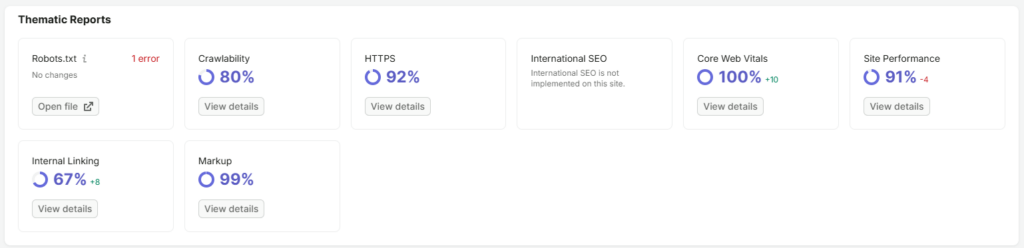
Improve Your Core Web Vitals
Core Web Vitals measure important parts of page experience, and core web vitals performance is commonly tracked through Largest Contentful Paint, First Input Delay, and cumulative layout shift.
In plain language, they help answer three questions:
- Does the page load quickly?
- Does it respond quickly when users interact?
- Does the layout stay stable while loading?
The core web vitals report in Google Search Console gives the best real-user view of issues.
Common causes of poor performance include:
- oversized images
- unnecessary scripts
- heavy themes or plugins
- poor hosting
- too many third-party tools
- unoptimized fonts
- render-blocking resources
- blocked or bulky css files
- heavy javascript files
The average desktop page loads in about 2.5 seconds, and 50% of users leave if a page takes longer than 3 seconds, so website speed matters.
Improving performance often requires both technical cleanup and better publishing discipline.
For example, if every blog post includes huge uncompressed images, your content workflow is creating SEO problems before the article even goes live. Watching cumulative layout shift cls alongside responsiveness issues also helps catch unstable templates before they affect rankings. Fewer than a third of sites pass consistently, which is why ongoing site speed work matters.
Avoid Intrusive Interstitials
Popups, overlays, and aggressive banners can interrupt the user experience.
This does not mean every popup is bad. A well-timed email signup form or booking prompt can be useful. But if your website blocks the main content immediately, especially on mobile, it can frustrate users and weaken performance.
Use interstitials carefully.
Ask:
- Does this help the user or only serve the business?
- Is it easy to close?
- Does it block important content?
- Does it slow down the page?
- Is it necessary on mobile?
A good website earns attention before it demands action.
3. Work on Your Website Navigation
Website navigation is not just a design issue. It is an SEO issue.
Your navigation tells users and search engines what matters, how pages relate to each other, and where the most important information lives.
You also help search engines understand relationships between topics, especially when you structure related pages into topic clusters for SEO and AI visibility. Use clear, descriptive anchor text for internal links instead of vague phrases.
A confusing site structure weakens both discovery and conversion. Focus on building links between closely related pages in an intentional way, not just adding them to tick a box.
Improve Your Website Structure
A strong site architecture is logical, simple, and scalable.
Ideally, your most important pages should not be buried deep inside your website. Users should be able to reach key pages within a few clicks from the homepage or main navigation. A flat URL structure and clear navigation also help search engines understand which pages matter most.
Think of your website as a system of meaning.
Your homepage introduces the brand. Your service pages explain what you do. Your blog builds topical authority. Your contact or booking pages convert interest into action.
When those parts are disconnected, the website becomes harder to understand.
A clean structure might look like this:
- Home
- About
- Services
- Blog or Resources
- Case Studies or Portfolio
- Contact or Booking
For larger sites, you can build deeper clusters. But the logic should still be clear.
Interlink Your Pages
Internal linking is one of the most underused parts of SEO.
When you link from one page to another, you help users continue their journey. You also help search engines understand relationships between topics.
For example, a blog post about “how lodges can increase direct bookings” might link to:
- a page about SEO services
- a guide on booking engine optimization
- a related article on Google Business Profile visibility
- a contact page for consultation
Internal links should feel natural and useful. Do not add links just to tick a box. Add them where they help the reader go deeper or take the next step.
Use Breadcrumbs
Breadcrumbs show users where they are within your website structure.
For example:
Home > Blog > SEO > Technical SEO Checklist
Breadcrumbs are useful because they improve navigation, reduce friction, and help search engines understand your site hierarchy.
They are especially helpful for blogs, ecommerce sites, tourism directories, large resource hubs, and websites with many categories.
Fix Orphaned Pages
An orphan page is a page that exists on your website but is not linked from anywhere else.
Search engines may struggle to discover orphan pages. Orphaned duplicate pages can also create indexing and duplicate-content problems. Users are unlikely to find them through normal navigation.
Sometimes orphan pages happen by accident. A blog post is published but never added to a category. A service page is created but never linked from the menu. A landing page remains live long after a campaign ends.
Over 95% of SEOs agree duplicate content affects rankings negatively, and Google penalizes sites with significant duplicate content issues. Use canonical tags to indicate the preferred version of content when multiple pages overlap and one version should be treated as the preferred page.
Audit your site for orphan pages and decide what to do with each one:
- link it properly if it is valuable
- update it if it is outdated
- consolidate or canonicalize it if it is one of several duplicate pages
- remove it if it no longer serves a purpose
Every page on your website should have a role.
4. Clean Up Your Site’s Code and Configuration
Search engines and AI systems do not see your website the way humans do.
They read the code, structure, metadata, links, markup, and server responses behind the page. Clean configuration helps them understand your content with less friction.
Use HTTPS
HTTPS protects data between the user and your website.
For modern websites, HTTPS is not optional. It is a basic trust requirement.
If your site still loads over HTTP, users may see browser warnings. That immediately damages credibility, especially if your website collects enquiries, payments, bookings, or personal details.
Make sure your SSL certificate is valid, your HTTPS version is the default, and all internal resources load securely.
Implement Hreflang for International Pages
If your website serves users in different languages or regions, hreflang can help search engines show the right version of a page to the right audience.
This matters for businesses targeting multiple countries or language groups.
For example, a tourism business serving both local and international guests may have different pages for different regions, languages, or travel markets.
Hreflang must be implemented carefully. Incorrect hreflang can confuse search engines and weaken the intended targeting.
Use it only when you genuinely have alternate versions of pages for different languages or regions.
Add Schema Markup
Structured data markup is data added to your pages to help search engines understand the meaning of your content, and Schema.org is the standard vocabulary used to implement it.
It can clarify what a page is about, what type of business you are, what services you offer, what reviews relate to, where your organization is located, and how your content should be interpreted.
Common schema types include:
- Organization
- Local Business
- Article
- FAQ
- Product
- Service
- Event
- Review
- Breadcrumb
Valid markup can improve click-through rates by enabling richer search results.
Schema does not replace good content. It supports good content by making it easier for machines to interpret.
For AI search and answer engines, structured clarity is increasingly valuable. The easier your content is to understand, the easier it becomes for systems to summarize, retrieve, and reference. Validate implementation with Google’s Rich Results Test.
5. Audit Your Site for AI Grounding and Agent Readiness
Search is moving beyond traditional rankings, driven by AI search that understands intent, context, and semantics.
AI systems now summarize answers, retrieve information from websites, compare options, and sometimes guide users through decisions, often relying on the same crawlable, indexable content foundation as Google when retrieving and citing information. This creates a new layer of technical and content readiness shaped by emerging AI search trends for visibility and trust in 2026.
Your website must not only be optimized for search engines. search visibility now includes AI surfaces such as ChatGPT and google’s ai overviews, which require answer engine optimization so your content is cited as a primary source. Content must also be machine-extractable and structurally clear if you want reliable citations and summaries. It must also be understandable to AI systems.
Check Robots.txt for AI Retrieval Access
Different crawlers and AI systems may interact with websites in different ways.
Your robots.txt file should reflect your business strategy. Some site owners want to restrict certain bots. Others want to allow discovery where it supports visibility.
The important point is to be intentional.
Review whether your technical settings allow the kinds of retrieval and discovery you actually want. If your goal is to be visible in AI-assisted search experiences, blocking useful access without understanding the impact may work against you, especially as AI search visibility statistics show these channels are growing fast.
Audit Semantic HTML and Page Accessibility
Semantic HTML means using the right HTML elements for the right purpose.
For example:
- headings should follow a logical structure
- navigation should be marked as navigation
- main content should be identifiable
- images should use descriptive file names and have meaningful alt text
- buttons and links should be used correctly
- forms should have labels
Semantic, machine-readable pages make it easier for both search engines and AI systems to extract content accurately from web pages.
This helps users, assistive technologies, search engines, and AI systems understand your pages.
Accessibility is not only a compliance issue. It is a clarity issue.
A well-structured page is easier for everyone to use and easier for machines to interpret.
Check Agentic Commerce Readiness
Agentic commerce refers to situations where AI agents help users make decisions or complete tasks.
For example, a user may ask an assistant to find accommodation, compare packages, check availability, or recommend a service provider.
If your website is unclear, poorly structured, or difficult to interact with, agents may struggle to understand what you offer.
To prepare, make sure your site has:
- clear service or product information
- accurate pricing or enquiry pathways where relevant
- structured contact and booking information
- accessible forms
- clean metadata
- updated business details
- clear policies
- trustworthy content signals
This is especially important for businesses where decisions involve comparison, trust, timing, and availability.
Tourism, hospitality, professional services, ecommerce, and nonprofit fundraising all fall into this category, where authority signals like backlinks that influence AI search visibility are increasingly important.
A Practical Technical SEO Audit Framework
If you want to audit your site without becoming overwhelmed, work in this order:
Crawlability: Can search engines access your site?
- Indexability: Are the right pages appearing in search?
- Site structure: Is your website logically organized?
- User experience: Is the site fast, mobile-friendly, and stable?
- Internal linking: Are important pages connected?
- Code and configuration: Is the technical setup clean, including unique title tags, meta descriptions, and H1 headings on every page?
- Structured data: Can machines understand your content clearly?
- AI readiness: Can answer engines and agents retrieve and interpret your information?
This order matters. Repeating this framework through periodic technical audits is what protects long-term search visibility.
Many businesses start with advanced tactics while ignoring basic technical weaknesses. But a website with indexing problems, broken links, poor mobile usability, and confusing navigation will always struggle to grow sustainably.
Common Technical SEO Mistakes to Avoid
Technical SEO problems often come from neglect, not intention.
Here are some of the most common mistakes:
- publishing pages without checking whether they are indexable
- changing URLs without setting up redirects
- installing too many plugins or scripts
- uploading large uncompressed images
- creating blog posts that are not internally linked
- blocking important pages in robots.txt
- ignoring mobile design
- letting old campaign pages remain live without purpose
- using vague page titles and poor heading structure
- failing to update schema markup after business changes
The solution is not to chase every technical detail at once.
The solution is to build a repeatable maintenance rhythm.
How Often Should You Run a Technical SEO Audit?
For most business websites, a light technical SEO check should happen monthly.
- A deeper audit should happen:
- before a website redesign
- after a migration
- after changing hosting
- after major plugin or CMS updates
- before launching a content campaign
- after a sudden traffic drop
- after major algorithm updates
- when expanding into new markets
- when adding ecommerce, booking, or multilingual functionality
Google makes hundreds of algorithm updates each year, many without warning, so monitoring changes is part of technical SEO maintenance.
Adapting to algorithm shifts can protect or improve website visibility and google traffic.
Technical SEO is not a one-time project. It is part of website governance.
The more important your website is to lead generation, bookings, sales, or brand authority, the more seriously you should treat its technical health.
The Real Goal of Technical SEO
The goal of technical SEO is not to impress search engines.
The goal is to remove friction.
You remove friction for crawlers so they can access your pages. You remove friction for search engines so they can understand your content. You remove friction for users so they can move confidently through your website. You remove friction for AI systems so they can retrieve and interpret your information accurately.
That is what makes technical SEO strategic.
It connects infrastructure to visibility. It connects structure to trust. It connects the hidden parts of your website to the public outcomes your business cares about.
A technically healthy website gives your content a fair chance to perform.
And in a digital environment shaped by search, AI discovery, and increasingly automated decision-making, that foundation is no longer optional. It is part of how modern brands become findable, credible, and ready for growth.