Crawling vs Indexing vs Ranking: The Difference That Explains Most SEO Problems

When a page does not appear in search, many businesses jump straight to rankings. They rewrite headings, add keywords, build links or request indexing again. But those actions solve different problems, and none will help if the real failure happened earlier in the search process.
A page must normally be discovered and crawled before a search engine can evaluate it for indexing. It must be indexed before it can be selected for a query. And even a page that ranks and attracts clicks can still fail to support the business if the visitor reaches the wrong offer or has no useful next step.
Understanding crawling vs indexing vs ranking gives you a diagnostic sequence. Instead of asking only, ‘Why am I not ranking?’, you can ask a better set of questions: Can the search engine reach the page? Can it understand and store the page? Should it select the page for this query?
The short answer: Crawling is access and retrieval. Indexing is understanding and storage. Ranking is selection for a specific query and context. A failure at one stage cannot usually be repaired by optimizing a later stage.
Key Takeaways
- Discovery, crawling, indexing and ranking are connected stages, not interchangeable SEO terms.
- A known URL may not have been crawled, and a crawled page may not have been indexed.
- Indexing makes a page eligible for search; it does not guarantee impressions, clicks or a particular ranking.
- Search Console reports answer different diagnostic questions and should be read together.
- Requesting indexing repeatedly does not fix weak content, duplication, crawl blocks or poor query relevance.
- The right SEO action depends on the earliest stage that is failing.
Crawling, Indexing and Ranking at a Glance
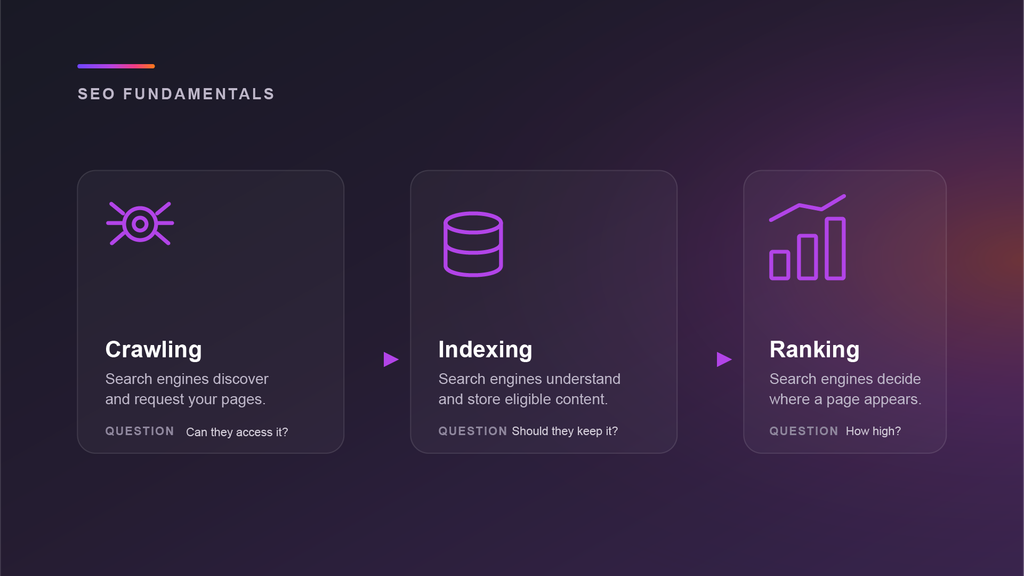
| Stage | Question | Main evidence |
| Discovery | Does the engine know the URL exists? | Links, sitemaps, redirects and known URLs. |
| Crawling | Can the engine request and process the page? | Robots rules, server responses, resources and rendering. |
| Indexing | Can the engine understand and store the page? | Content, canonical signals, noindex, duplication and quality. |
| Ranking | Should the page be selected for this query? | Intent, relevance, usefulness, context, competition and authority. |
| Conversion | Does the visit create a useful business outcome? | Audience fit, internal journey, offer, CTA and measurement. |
Why These Stages Are So Easy to Confuse
Search visibility is often discussed as if one switch controls everything. In reality, several systems must work in sequence. A page can be technically accessible but excluded from the index. It can be indexed but irrelevant to the queries you care about. It can rank for informational searches and still attract no qualified enquiries.
The confusion is made worse by tools that use broad labels such as SEO score, visibility or optimization. Those scores can be useful summaries, but they do not replace stage-level evidence. The first task is to find the earliest point where the page stops progressing.
Before Crawling: URL Discovery
Crawling cannot begin until the search engine knows a URL exists. Search engines discover pages through links, XML sitemaps, redirects and URLs they have encountered before.
An orphan page can be perfectly written and technically indexable but remain difficult to discover because nothing useful links to it. Adding the URL to a sitemap can help, but the stronger solution is usually to connect the page to the site’s real architecture through relevant navigation, hub pages and contextual internal links.
Stage 1: Crawling
Crawling is the process of requesting a URL and processing the server’s response. A search crawler checks whether access is allowed, makes an HTTP request, handles redirects or errors, reads available resources, extracts links and may render JavaScript.
Crawling answers an access question: can the search engine retrieve a usable version of this page? It does not decide whether the content deserves to be indexed or ranked.
Evidence That Crawling Is the Problem
- The URL Inspection live test cannot access the page.
- Robots.txt disallows the page or resources required to render it.
- The server returns 4xx, 5xx, timeout or DNS errors.
- A firewall or CDN blocks legitimate crawler requests.
- Redirect chains, loops or malformed URLs prevent a final response.
- Important text or links appear only after JavaScript fails or a user interaction occurs.
- Server logs show that the crawler rarely or never requests the URL.
Actions That Belong at the Crawling Stage
- Fix server, DNS, CDN and firewall failures.
- Correct unintended robots.txt restrictions.
- Use direct redirects and remove loops.
- Make important links crawlable and give every priority page a discovery path.
- Ensure essential content and metadata are available in a reliable rendered version.
- Control endless parameter combinations, calendar URLs and crawler traps.
Wrong remedy: Adding more keywords or backlinks will not make an inaccessible URL crawlable. Fix access first.
Stage 2: Indexing
Indexing begins after the search engine has processed a page. The system analyzes the main content, titles, headings, images, video, structured data, language, canonical signals and other information. It then decides whether and how the page should be represented in the search index.
Indexing answers an understanding and storage question: does this page add a useful, distinct representation to the index? Crawling is required for the search engine to see a noindex directive, but crawling alone does not guarantee inclusion.
Evidence That Indexing Is the Problem
- URL Inspection reports that the page is not indexed even though the live page is accessible.
- The Page Indexing report shows Crawled – currently not indexed.
- Google selected a different canonical URL.
- A noindex directive is present in HTML or an HTTP header.
- The page is treated as a duplicate or alternate version.
- The rendered page contains little useful or distinctive main content.
- A soft 404 or other quality signal suggests the page does not provide a meaningful destination.
Actions That Belong at the Indexing Stage
- Remove accidental noindex directives while keeping the page crawlable.
- Align redirects, internal links, sitemap entries and canonical tags around one preferred URL.
- Separate pages that genuinely need to exist by giving each a distinct purpose and substantial content difference.
- Consolidate duplicate or thin pages that do not need separate URLs.
- Improve the visible main content rather than adding metadata around a weak page.
- Check the rendered HTML and confirm that essential content is available to the indexing system.
Wrong remedy: Requesting indexing over and over does not force inclusion. Google states that crawl requests do not guarantee indexing, and repeated requests do not make crawling happen faster.
Stage 3: Ranking and Serving
Ranking happens when a user enters a query. The search engine searches its index, interprets the intent and uses automated systems to select the results it considers most relevant and useful in that context. Google describes this stage as serving search results.
Ranking answers a selection question: should this indexed page appear for this query, for this person, in this location, language and device context? A page is not assigned one permanent ranking. Its visibility varies across queries and search-result formats.
Evidence That Ranking Is the Problem
- URL Inspection confirms that the page is indexed.
- The Performance report shows few or no impressions for relevant queries.
- The page receives impressions but appears in low positions.
- The ranking queries do not match the page’s intended audience or purpose.
- Competing results satisfy a different format or intent, such as local, video, comparison or transactional results.
- Another page on the site is a clearer or stronger match for the same query.
Actions That Belong at the Ranking Stage
- Clarify the search intent and the decision the page should support.
- Improve the depth, originality, evidence and usefulness of the main content.
- Choose the content format that matches the current results page.
- Strengthen relevant internal links and descriptive anchor text.
- Earn legitimate authority and references from relevant sources.
- Improve titles and search appearance when impressions are present but clicks are weak.
- Resolve overlap between pages competing for the same intent.
Wrong remedy: A clean technical audit does not create query relevance. Once the page is accessible and indexed, ranking work must improve the actual answer and its relationship to the rest of the web.
The Fourth Layer: Conversion
SEO diagnosis should not end when the page ranks. A page can be indexed, visible and clicked while producing no meaningful outcome. That may be a content-to-business alignment problem rather than a search-engine problem.
Review whether the queries attract the right audience, whether the article links to an appropriate next step, whether the offer is clear, and whether analytics capture enquiries, downloads, bookings or other useful actions. This is where visibility becomes growth.
A Stage-by-Stage Diagnostic Matrix
| Observed situation | Likely stage | Investigate first |
| Google does not know the URL | Discovery | Internal links, sitemap, redirects and publication path. |
| Discovered – currently not indexed | Crawling / prioritization | Access, server health, URL patterns, site architecture and patience. |
| Live test fails | Crawling | Robots, response codes, CDN, firewall, rendering and redirects. |
| Crawled – currently not indexed | Indexing | Content value, duplication, canonical signals, rendering and noindex. |
| Google chose another canonical | Indexing / canonicalization | Consistency of redirects, links, sitemap, content and canonical annotations. |
| Indexed with no relevant impressions | Ranking | Intent, query relevance, competition, content format and usefulness. |
| Impressions but weak clicks | Search appearance | Title, snippet, SERP features, brand recognition and intent alignment. |
| Clicks but no business outcome | Conversion | Audience quality, internal journey, CTA, offer and analytics. |
How to Use Search Console Without Mixing the Stages
URL Inspection
URL Inspection shows information about the indexed version of a page and allows you to test a live URL. Those are not the same view. The indexed record tells you what Google has stored. The live test tells you what Google can access now. A successful live test does not prove that the page is indexed or will be indexed.
Page Indexing Report
The Page Indexing report helps identify site-wide patterns: blocked pages, duplicates, redirects, server errors, discovered URLs and crawled pages that were not indexed. Use the patterns to find template or architecture problems rather than treating every URL as an isolated case.
Crawl Stats and Server Logs
Crawl Stats summarizes Googlebot activity and host responses. Server logs provide direct evidence of crawler requests, response codes and timing. These sources are most useful for crawling questions, not for judging content quality or query relevance.
Performance Report
The Performance report shows impressions, clicks, positions and queries for pages appearing in search. It becomes useful after indexing. If a page is not indexed, ranking data will not solve the indexing problem.
A Practical Diagnosis Workflow
- Confirm the exact URL and its intended canonical. Avoid diagnosing the wrong protocol, hostname, parameter or redirected address.
- Check whether the page is discoverable. Find its internal links and confirm it appears in the correct sitemap when appropriate.
- Run a live URL test. Confirm that crawling is allowed, the server responds successfully and important content renders.
- Check the indexed record. Review index status, Google-selected canonical and the last crawl information.
- Review the Page Indexing report for similar URLs. Look for a site-wide pattern rather than one isolated symptom.
- If indexed, move to the Performance report. Study query relevance, impressions, positions, clicks and search-result context.
- If traffic arrives, review business outcomes. Check internal journeys, CTA performance and conversion measurement.
- Fix the earliest failed stage, then allow time for recrawling and reprocessing before judging the result.
Common Diagnostic Mistakes
Mistake 1: Treating a site: search as a complete index report
Search operators can be useful for quick investigation, but Search Console provides better evidence about the index status of URLs you own.
Mistake 2: Requesting indexing repeatedly
Repeated requests do not make a weak, duplicate or inaccessible page more indexable. Fix the underlying issue and request a recrawl once the page has materially changed.
Mistake 3: Building links to a blocked or noindexed page
Authority work cannot correct an instruction that prevents access or indexing. Resolve technical eligibility first.
Mistake 4: Expanding content when the server is failing
A longer article is irrelevant if the crawler receives timeouts or errors. Separate infrastructure problems from editorial problems.
Mistake 5: Assuming indexed means optimized
Indexing is eligibility, not endorsement. The page still has to satisfy a query more effectively than the available alternatives.
How AI Overviews and AI Mode Fit Into the Sequence
Google states that a page must be indexed and eligible to appear in Search with a snippet before it can be shown as a supporting link in AI Overviews or AI Mode. There is no separate AI-only route around crawling, indexing and search eligibility.
AI search can broaden the queries and subtopics through retrieval and query fan-out, but the diagnostic order remains the same: technical access, indexing eligibility, relevance and usefulness. Special AI schema does not repair a failure in those foundations.
Frequently Asked Questions
What is the difference between crawling and indexing in SEO?
Crawling is when a search engine requests and processes a page. Indexing is when the engine analyzes the page and stores a representation in its search index. A page can be crawled without being indexed.
Can a page be indexed without ranking?
Yes. Indexing makes a page eligible to appear. The page may still receive few impressions because it does not match relevant queries strongly enough, faces stronger competition or serves a different intent.
What does Discovered – currently not indexed mean?
It generally means Google knows the URL but has not crawled it yet. Investigate discovery quality, server reliability, URL patterns and site architecture, then allow time for processing.
What does Crawled – currently not indexed mean?
It means Google crawled the URL but did not add it to the index at that time. Review the page’s distinct value, duplication, canonical signals, rendering and indexing directives.
Does requesting indexing improve rankings?
No. A request can ask Google to recrawl a page. It does not purchase indexing or improve the page’s relevance and usefulness for a query.
How long does crawling and indexing take?
There is no fixed schedule. Google says crawling can take from days to weeks, and indexing is not guaranteed. Large changes, new sites, site quality, server performance and discovery paths can all affect timing.
The Practical Takeaway
Crawling, indexing and ranking describe different decisions. A crawler asks whether it can retrieve the page. The indexing system asks whether the page should be stored and represented. The ranking system asks whether it is a useful result for this query.
Good SEO diagnosis moves in that order. Find the earliest failed stage, use evidence that belongs to that stage, apply the relevant fix and wait for the system to reprocess the page. That discipline prevents teams from solving ranking problems with technical theatre and technical problems with more content.
For the full search process, read How Search Engines Work. For deeper crawling detail, continue to What Is a Web Crawler?. To investigate a live website, use my Semrush site-audit guide.