How to Conduct a Site Audit Using Semrush
A practical step-by-step guide to auditing technical SEO, on-page issues, backlinks, rankings, AI visibility, and content gaps with Semrush

A site audit is not just a technical hygiene exercise. It is how you find the issues that are suppressing visibility, weakening important pages, and giving competitors an easier path to outrank you.
With Semrush, you can run that audit inside one connected workflow instead of jumping between disconnected SEO tools. Site Audit shows technical risk. On Page SEO Checker shows where key pages need work. Position Tracking shows what is happening in search.
Keyword Gap and Backlink Gap show where competitors are winning. And Semrush’s newer AI visibility features help you see whether your site is even set up to be discovered and cited in answer-led search.
The mistake many teams make is treating an audit like a long export of warnings. That is not an audit. A real audit tells you what matters, why it matters, and what to fix first.
This guide walks through a practical Semrush-led audit process you can use for your own site or for a client. The goal is simple: leave the audit with a clear diagnosis and a prioritized action plan.
Semrush tools to include in the audit
| Tool | Role in the audit |
| Site Audit | Run the technical crawl, review errors and warnings, use thematic reports, and check AI crawler access. |
| On Page SEO Checker | Audit important landing pages and get ideas around content, semantics, backlinks, UX, and technical issues. |
| Position Tracking | Monitor rankings, visibility trends, SERP features, and the impact of fixes after the audit. |
| Keyword Gap | Find keyword and topic opportunities competitors rank for that your site is missing or underperforming on. |
| Backlink Audit and Backlink Gap | Review backlink risk, isolate suspicious links, and identify authority opportunities competitors already have. |
| AI Visibility Toolkit | Measure mentions, share of voice, cited pages, prompt-level visibility, and competitor gaps in AI answers. |
What you should gather before you begin
Your main domain, subdomains, or subfolders to include in scope
A list of top commercial pages, lead-generation pages, and high-value content assets
Google Search Console and Google Analytics access if you want better prioritization inside Semrush
Three to five true search competitors, not just business competitors
A clear primary goal for the audit: recovery, growth, migration QA, content expansion, or AI visibility readiness
What a strong Semrush audit should answer
A useful audit should answer six questions clearly.
- Can search engines and AI crawlers access the site?
- Are the most important pages technically healthy?
- Do core pages match search intent and deserve to rank?
- Is the site missing topics competitors already own?
- Is the backlink profile helping or hurting? And is the brand visible in modern answer engines at all?
If your audit cannot answer those questions, it is probably too shallow or too fragmented. The value of using Semrush is that you can check each layer in sequence and connect findings instead of treating every report as an island.
Before you start the crawl
Define scope first.
Decide whether you are auditing the full domain, a subdomain, a subfolder, or a specific market version of the site. Then list the pages that matter most commercially so they do not get buried under low-value noise.
If you can, connect Google Search Console and Google Analytics before or during the process. Semrush can use those signals to help you focus on pages that already matter, which is far better than treating every URL as equally important.
Step 1: Set up Site Audit properly
Start with Semrush Site Audit because it is the technical foundation of everything else. Configure the crawl carefully. Make sure the crawl scope, crawl source, and page limits reflect the real site you want to diagnose.
Do not rush past setup. A weak crawl creates weak conclusions. If the site has important subfolders, JavaScript-heavy areas, or multiple versions that can be indexed, your setup needs to capture that reality.
Once the crawl runs, review the overview first. Semrush will show a Site Health score, issue counts, top issues, and thematic reports. Treat the score as a summary metric, not the final answer.
Step 2: Prioritize technical issues the right way
Semrush groups findings into errors, warnings, and notices. Start with errors, then review the top issues widget, and only after that move into lower-priority cleanup.
This is where many audits go sideways. A missing alt attribute on a low-value image should not get the same attention as a blocked section, a broken canonical setup, or a cluster of 5xx pages.
Use the thematic reports to isolate the issues that actually change search performance: crawlability, indexability, HTTPS, internal linking, site performance, structured data, and Core Web Vitals-related risk.
Step 3: Check crawlability, indexability, and AI readiness
Your first real technical question is whether important pages can be found and processed. Review pages blocked by robots directives, accidental noindex tags, broken status codes, redirect chains, orphan pages, and duplicate-access paths.
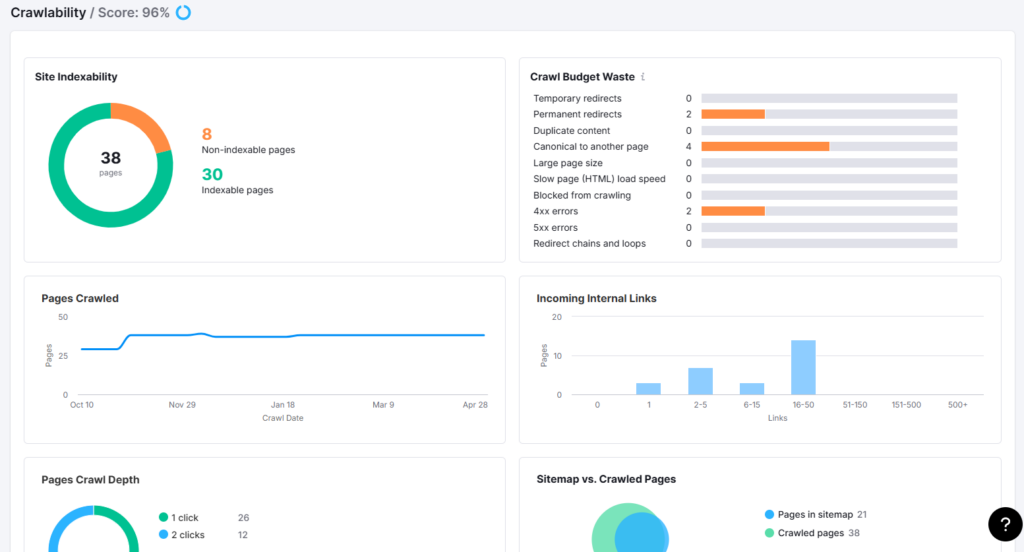
Semrush Site Audit now also includes AI-readiness checks. That matters because a modern audit should confirm you are not blocking important AI crawlers such as ChatGPT-User, OAI-SearchBot, Google-Extended, Perplexity, or Claude-related crawlers by mistake.
If critical content is inaccessible, nothing else matters much. Fix access and indexing barriers before you spend time refining copy, building links, or reporting on ranking drops.
Step 4: Review architecture, internal linking, and page depth
Once the obvious blockers are clear, study how the site is structured. Important pages should not be buried deep in the click path or isolated from the rest of the site.
Use Semrush’s crawl data and internal linking reports to see whether category pages, service pages, product collections, and authority content are receiving enough internal support. Weak internal linking often explains why strong pages still underperform.
This part of the audit is especially important for content-heavy sites. If your best pages are disconnected from one another, the site will struggle to build topical clarity and authority.
Step 5: Audit priority pages with On Page SEO Checker
After the technical layer, move to your highest-value pages. Semrush On Page SEO Checker compares your target pages against the pages already winning in search and groups recommendations into useful categories such as strategy, content, semantic coverage, backlinks, UX, technical SEO, and SERP features.
Do not feed every page into the tool at once. Start with pages that already rank on page one or page two, pages tied to revenue, and pages that attract impressions but underperform on clicks or conversions.
Look for gaps in intent match, topical depth, title and heading quality, supporting terms, internal linking, and page experience. The point is not to implement every suggestion mechanically. The point is to understand why competing pages look more complete or more useful than yours.
Step 6: Audit rankings with Position Tracking
Next, open Position Tracking so the audit is grounded in current search performance rather than theory. Add the core keyword set that matters to the business and segment it by page type, service line, product family, or location.
Review visibility trends, average position movement, ranking distribution, and SERP feature presence. This helps you see whether the site has a technical problem, a page-quality problem, or a demand and competition problem.
Position Tracking is also where you connect changes to outcomes. When you fix important issues, annotate the dates so future ranking movement can be interpreted against real work instead of guesswork.
Step 7: Find content gaps with Keyword Gap
A good site audit should show what is missing, not just what is broken. That is where Keyword Gap becomes powerful. Compare your domain with direct search competitors and look for keywords they rank for that your site does not.
Focus on relevance first. The best opportunities are not random high-volume terms. They are commercially useful keywords, supporting informational queries, and topical clusters that strengthen pages already important to the business.
As you review the gap, separate opportunities into three buckets: keywords that deserve new pages, keywords that should be absorbed into existing pages, and keywords that reveal a broader topical weakness in your content architecture.
If you want to expand the editorial angle further, you can use Topic Research after Keyword Gap. But for a true site audit, the content-gap diagnosis should begin with competitive keyword overlap and what your current site is missing.
Step 8: Review backlink risk and authority gaps
Now move off-site. Use Backlink Audit to assess whether the backlink profile contains suspicious links, spam signals, or concentrations that deserve a closer look. The goal is not to panic over every toxic marker. It is to identify patterns that could reflect real quality problems.
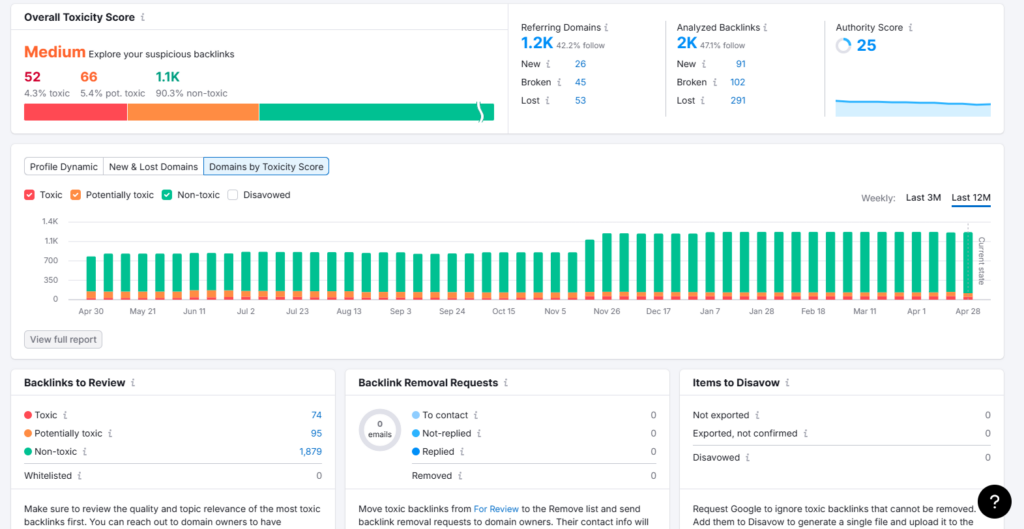
Then use Backlink Gap to compare your link profile against competitors. This turns backlink analysis from a defensive exercise into an opportunity map. You can see which referring domains support competitors but do not link to you yet.
This is often where the audit becomes strategic. If two competitors consistently earn links from trade publications, directories, association sites, or high-trust industry resources and you do not, that is not just a backlink issue. It is a market visibility issue.
Step 9: Check AI visibility and answer-engine coverage
Traditional rankings still matter, but they are no longer the whole discovery picture. Semrush’s AI Visibility Toolkit helps you measure whether your brand is being mentioned in AI-generated answers, which topics you show up for, which pages are cited, and how that visibility compares with competitors.
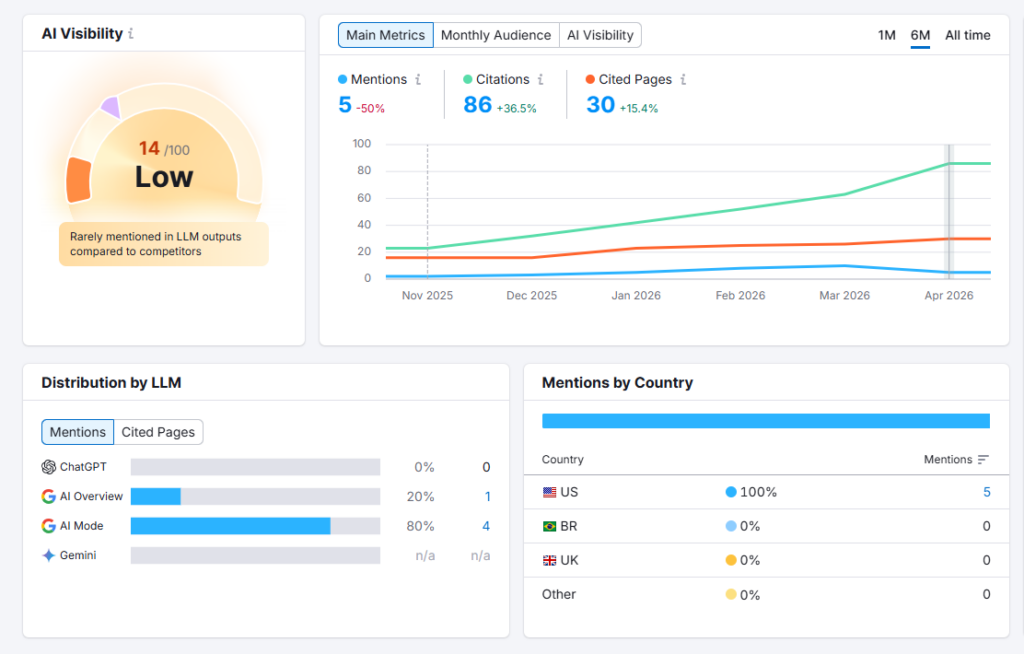
This part of the audit matters for two reasons. First, it shows whether your brand is absent from the answer layer even when you rank decently in search. Second, it shows the topics and narrative themes competitors are owning in AI systems before that gap becomes obvious in analytics.
If you do not have access to the full AI Visibility Toolkit, you can still use Site Audit’s AI-readiness checks to confirm technical accessibility. But if you do have the toolkit, include AI visibility as a formal audit section, not a side note.
Step 10: Turn findings into a fix-first roadmap
This is the point where the audit either becomes useful or collapses into a document nobody acts on. Group findings into clear categories: technical blockers, structural weaknesses, page-level optimization issues, content gaps, backlink issues, ranking opportunities, and AI visibility risks.
Then rank those findings by business impact. In most cases, the practical order is: fix crawl and indexing blockers first, repair high-impact technical and internal-linking issues second, improve revenue-critical pages third, close the most strategic content gaps fourth, strengthen authority fifth, and monitor the effect with Position Tracking and repeat crawls.
Semrush’s Progress reporting inside Site Audit is useful here. Re-run the campaign after fixes, watch the issue trend over time, and combine those changes with ranking and visibility movement so the audit becomes an operating system rather than a one-time report.
A simple way to score what to fix first
If you are auditing a large site, create a simple priority score for every issue cluster. Score it against impact on discoverability, effect on revenue pages, ease of implementation, and whether it blocks other work. This stops the team from spending a week polishing minor notices while deeper issues remain untouched.
Common mistakes when using Semrush for site audits
The first mistake is confusing volume with insight. Exporting hundreds of warnings is not the same as diagnosing what is suppressing growth.
The second is auditing only technical SEO. Many sites lose because of weak pages, weak topic coverage, or weak authority even when the crawl looks acceptable.
The third is using Semrush tools in isolation. Site Audit, On Page SEO Checker, Position Tracking, Keyword Gap, Backlink Audit, and AI visibility data are far more useful when they inform one another.
The fourth is ignoring AI discovery. If your content is inaccessible to AI crawlers or your competitors dominate answer-led prompts, your audit is incomplete.
Final Takeaway
A strong Semrush audit is not a pile of dashboards. It is a sequence. Start with the crawl, confirm access and indexability, inspect structure, improve priority pages, compare rankings and content coverage, review authority, then check whether the brand is visible in AI-driven discovery.
When you follow that order, Semrush stops being a collection of tools and becomes a practical decision-making system. That is what a site audit should deliver: clarity, priorities, and the next right actions.
Recommended order of execution
| Priority | Area | What to address |
| 1 | Crawl and indexing blockers | Blocked important pages, noindex mistakes, 5xx errors, broken canonicals, AI crawler restrictions |
| 2 | Structural issues | Shallow internal linking, orphan pages, poor click depth, redirect waste, duplicate paths |
| 3 | Priority page fixes | Weak intent match, thin copy, missing semantic support, poor headings, weak CTR elements |
| 4 | Content gaps | Missing service pages, missing cluster content, competitor-owned topics, uncaptured query themes |
| 5 | Authority gaps | Suspicious backlinks, weak referring-domain quality, competitor link advantages |
| 6 | Monitoring and iteration | Re-crawl, track rankings, annotate changes, compare AI visibility and page-level progress |